═══════════════════════════════════════════
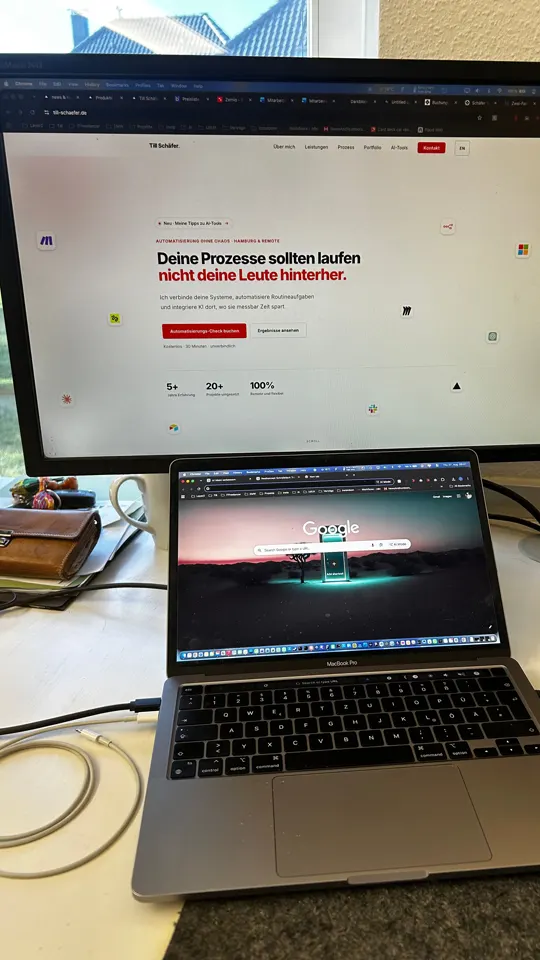
BILD 0 — DEIN EIGENES FOTO  (kein Prompt)
═══════════════════════════════════════════
Fotografiere deinen echten Schreibtisch hochkant, aus Augenhöhe im Stehen,
mit Monitor, Laptop und Tischkanten im Bild. Dieses Foto ist die
Strukturreferenz für ALLE fünf Bild-Prompts und gleichzeitig der
Startframe von Clip 1. Je klarer die Kanten, desto stabiler die Kette.


═══════════════════════════════════════════
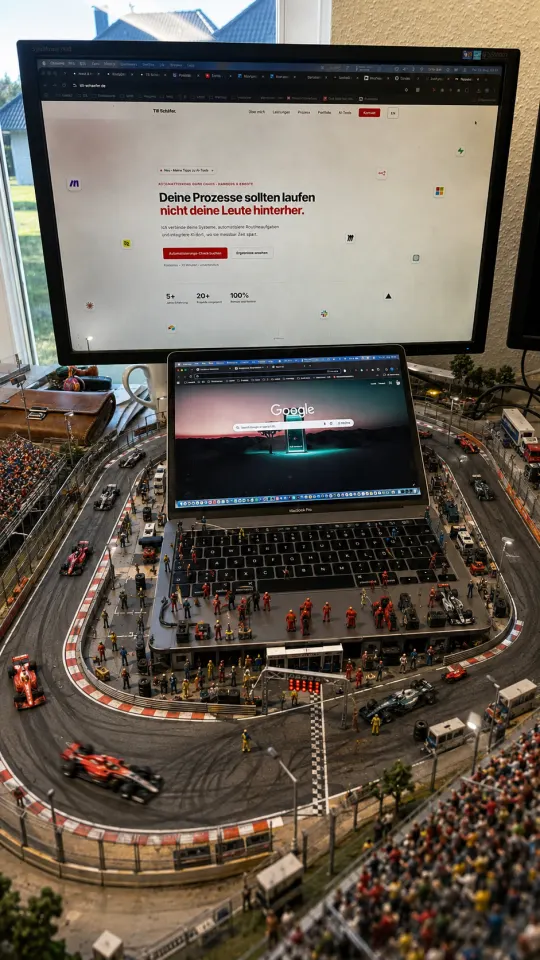
BILD 1 — DEIN SCHREIBTISCH ALS F1-KURS  (ChatGPT)
═══════════════════════════════════════════
Use the provided real desk photo as the strict structural reference.

Create a vertical 9:16 ultra-photorealistic image of the EXACT SAME real workstation transformed into a miniature Formula 1 racing circuit.

Preserve the exact original camera angle, framing, perspective and workstation geometry.

The following objects must remain clearly recognizable and in exactly the same position:
the large external monitor,
the open MacBook Pro,
the MacBook screen,
keyboard and trackpad,
the white desk surface and desk edges,
the cables,
the white mug,
the brown wallet,
the window,
the beige wall,
and the visible second monitor edge on the right.

Do NOT replace the desk with a racetrack.
The Formula 1 world must be a miniature diorama constructed directly ON TOP OF and AROUND the existing desk.

Build a detailed miniature Formula 1 circuit winding across the desk surface and around the MacBook.

Add realistic asphalt, red-and-white curbs, safety barriers, fencing, pit lane markings, starting lights, miniature grandstands, tiny spectators, pit crews, mechanics, tire stacks and service equipment.

Several tiny Formula 1 cars race around the desk.

The MacBook remains fully recognizable and acts as the central paddock and pit-lane landmark.

Integrate some miniature pit-lane details around the keyboard, but keep the physical keys and trackpad clearly visible.

The large monitor must remain the same real monitor and must not become a different building.

Keep the real desk edges visible so the viewer immediately understands this is still the same workstation.

Natural daylight from the original room.
Ultra-photorealistic.
Premium miniature diorama photography.
Extremely detailed.
Believable scale.
No cartoon style.
No text overlay.

HARD CONSTRAINT:
This must look like a miniature Formula 1 circuit was physically built on the real desk, not like the workstation was transported to a racetrack.


═══════════════════════════════════════════
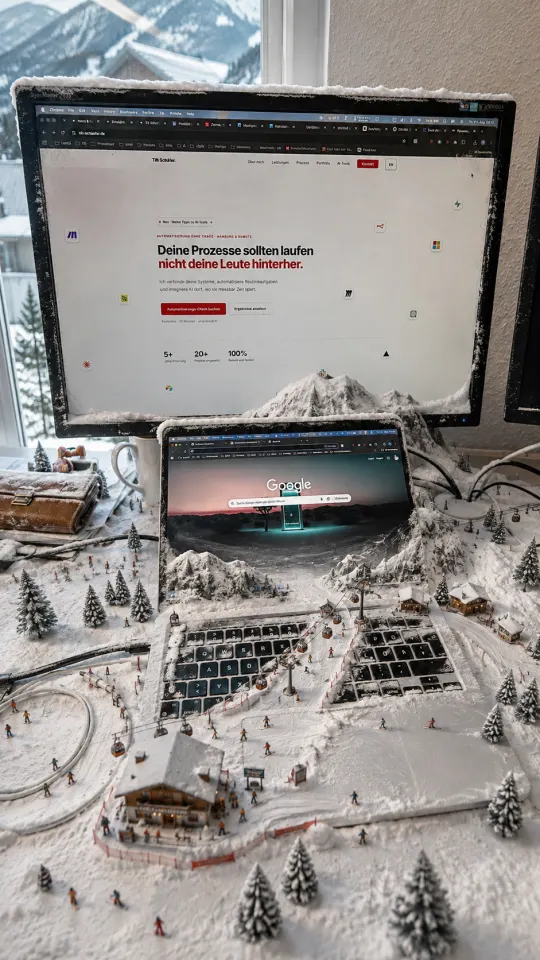
BILD 2 — DERSELBE TISCH ALS SKIGEBIET  (ChatGPT)
═══════════════════════════════════════════
Use the provided real desk photo as the strict structural reference.

Create a vertical 9:16 ultra-photorealistic image of the EXACT SAME real workstation transformed into a miniature alpine ski resort.

Preserve the exact original camera angle, framing, perspective and workstation geometry.

The following objects must remain clearly recognizable and fixed in exactly the same position:
the large external monitor,
the open MacBook Pro,
the MacBook screen,
keyboard and trackpad,
the white desk,
the desk edges,
the cables,
the white mug,
the brown wallet,
the window,
the beige wall,
and the visible second monitor edge on the right.

Do NOT replace the workstation with a mountain landscape.
The ski resort must exist as a miniature diorama built directly ON TOP OF and AROUND the real desk.

Cover selected areas of the desk with realistic miniature snow while keeping large parts of the physical workstation recognizable.

Create tiny ski slopes flowing around and partially across the MacBook keyboard.

Add miniature skiers and snowboarders, ski tracks, alpine cabins, small ski lodges, chairlifts, gondolas, lift towers, slope fences, signs and snow-covered pine trees.

The MacBook remains completely recognizable and acts as the central mountain/resort landmark.

The keyboard and trackpad must remain visible underneath and between the snow and miniature resort details.

The external monitor stays unchanged as the same physical monitor.

Keep the room, window and desk edges clearly visible.

Bright natural winter daylight.
Crisp realistic snow.
Ultra-photorealistic miniature photography.
Highly detailed.
Believable scale.
No fantasy illustration.
No text overlay.

HARD CONSTRAINT:
This is the same real office desk with a miniature ski resort built on it, not a full mountain environment.


═══════════════════════════════════════════
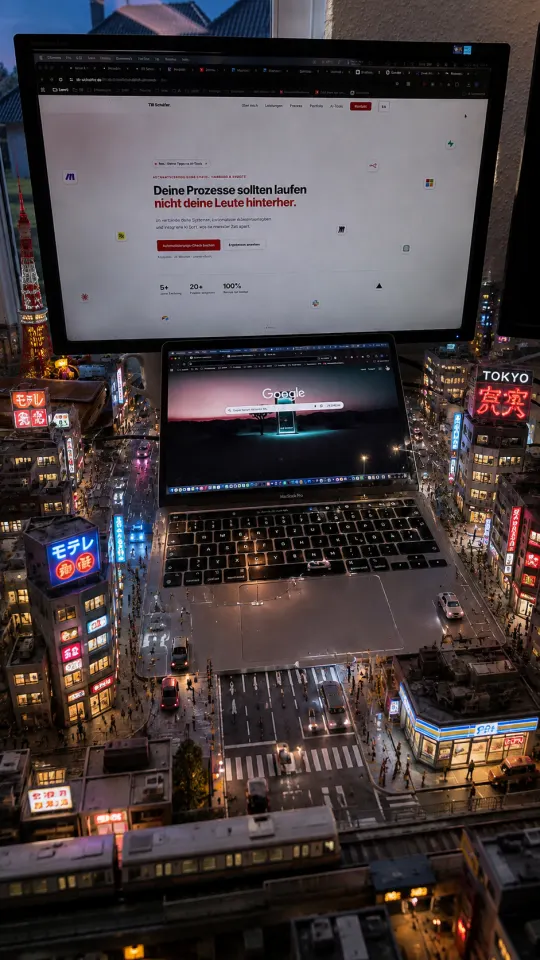
BILD 3 — DERSELBE TISCH ALS MINI-TOKIO  (ChatGPT)
═══════════════════════════════════════════
Use the provided real desk photo as the strict structural reference.

Create a vertical 9:16 ultra-photorealistic image of the EXACT SAME real workstation transformed into a miniature Tokyo city.

CRITICAL: preserve the original desk setup exactly.

The following elements must remain clearly visible, recognizable and in exactly the same location, size, angle and perspective as in the reference photo:

the full large external monitor,
the full open MacBook Pro,
the MacBook screen,
keyboard and trackpad,
the white desk surface and visible desk edges,
the white cable loop on the left,
the black cables on the right,
the white mug,
the brown leather wallet,
the window and outside background,
the beige wall,
and the visible edge of the second monitor on the right.

Do NOT replace the desk with a city.
Do NOT turn the entire room into Tokyo.

Tokyo must exist ONLY as a miniature diorama built directly ON TOP OF and AROUND the existing desk and workstation.

Keep at least 60–70% of the original workstation visibly recognizable.

Build tiny Tokyo streets across the desk surface and around the MacBook.

The MacBook remains completely recognizable and acts as the central landmark of the miniature city.

Tiny streets can run between and around the keyboard keys, but the keyboard must remain visibly a real keyboard.

Add dense miniature Japanese buildings, tiny streets and intersections, crosswalks, small cars, pedestrians, elevated train tracks, streetlights, narrow alleys, small convenience stores and subtle Japanese-style illuminated signage.

Keep all architecture at miniature scale.

The large monitor must remain the same real monitor and must NOT become a skyscraper.

The desk edges must remain visible.

Lighting:
blue hour / early night Tokyo atmosphere with subtle neon reflections while preserving the original room structure.

Ultra-photorealistic.
Premium miniature diorama realism.
Highly detailed.
Real-world materials.
No fantasy illustration.
No text overlay.
No complete environment replacement.

HARD CONSTRAINT:
This must look like miniature Tokyo was physically constructed on the real desk, not like the desk was transported into Tokyo.


═══════════════════════════════════════════
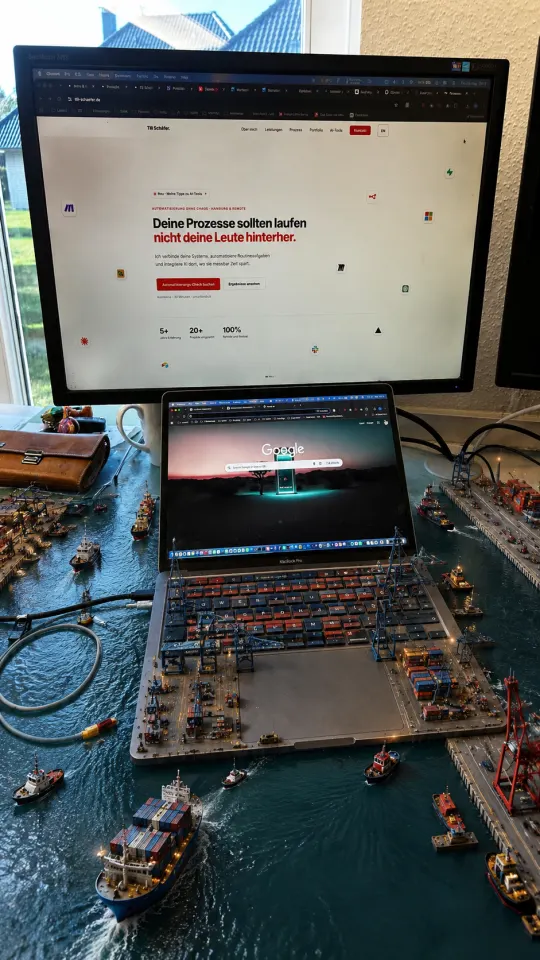
BILD 4 — DERSELBE TISCH ALS CONTAINERHAFEN  (ChatGPT)
═══════════════════════════════════════════
Use the provided real desk photo as the strict structural reference.

Create a vertical 9:16 ultra-photorealistic image of the EXACT SAME real workstation transformed into a miniature industrial ocean port.

CRITICAL: preserve the original desk geometry and workstation exactly.

The following objects must remain clearly visible and fixed in their original position:

the full external monitor,
the full open MacBook Pro,
the MacBook display,
keyboard,
trackpad,
white desk surface,
visible desk edges,
white cable loop on the left,
black cables on the right,
white mug,
brown wallet,
window,
beige wall,
and second monitor edge on the right.

Do NOT replace the entire desk with ocean.
Do NOT create a full-size harbor landscape.

The ocean port must exist as a miniature diorama built directly ON TOP OF the existing desk.

Keep the workstation clearly recognizable.

Create narrow realistic water channels across selected areas of the desk surface while large sections of the physical white desk remain visible.

The MacBook remains completely recognizable and becomes the central miniature container terminal.

Integrate small container cranes, stacked containers, dock roads, tiny trucks, service vehicles, dock workers, industrial lights, piers, tugboats and one or two miniature container ships.

Some harbor water can surround parts of the MacBook, but do not submerge or remove the laptop.

The keyboard must remain visually recognizable beneath and between miniature terminal details.

The cables must remain recognizable as the same real cables.

The external monitor must remain the same physical monitor.

Keep the real desk boundary clearly visible.

Natural realistic lighting.
Ultra-photorealistic.
High-detail miniature port diorama.
Believable miniature water scale and reflections.
No text overlay.
No complete scene replacement.

HARD CONSTRAINT:
The viewer must immediately recognize the same real desk from the original photograph.


═══════════════════════════════════════════
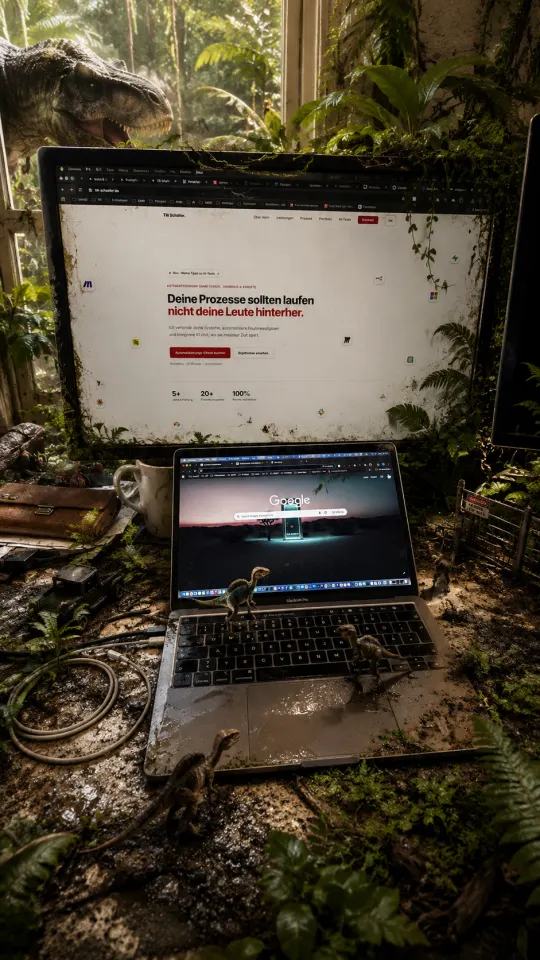
BILD 5 — DERSELBE TISCH ALS URZEIT-DSCHUNGEL  (ChatGPT)
═══════════════════════════════════════════
Use the provided real desk photo as the strict structural reference.

Create a vertical 9:16 ultra-photorealistic image of the EXACT SAME real workstation being partially overtaken by a miniature prehistoric jungle.

CRITICAL: preserve the real desk and workstation.

The following objects must remain clearly visible, recognizable and fixed in exactly their original position:

the full external monitor,
the full MacBook Pro,
the laptop display,
keyboard,
trackpad,
white desk,
visible desk edges,
white cable loop,
black cables,
white mug,
brown leather wallet,
window,
beige wall,
and second monitor edge.

Do NOT transform the complete room into a jungle.
Do NOT remove the desk.
Do NOT hide the workstation behind vegetation.

The prehistoric ecosystem must exist primarily ON TOP OF and AROUND the desk.

Keep the majority of the real workstation visible.

Add realistic miniature jungle growth across selected areas:
ferns,
moss,
small tropical plants,
vines,
wet mud,
tiny puddles,
fallen branches.

Vegetation can grow between the keyboard keys and around the laptop, but the keyboard and MacBook must remain clearly recognizable.

Add several small realistic dinosaurs moving across the desk and keyboard.

Add one larger dramatic dinosaur in the background near the window, partially entering the real office environment, but do not let it dominate or replace the workstation.

The monitor must remain the same real monitor.

Keep the desk edges visible.

Photorealistic wet surfaces.
Natural cinematic daylight.
Premium prehistoric miniature diorama realism.
No cartoon look.
No fantasy illustration.
No text overlay.

HARD CONSTRAINT:
This is the same real office desk with a miniature prehistoric ecosystem growing across it, not a full jungle scene.


═══════════════════════════════════════════
CLIP 1 — ORIGINAL ➝ FORMEL 1  (Flow, Frames to Video)
═══════════════════════════════════════════
Use image 1 as the exact starting frame and image 2 as the exact ending frame.

Create one seamless continuous transformation.

Preserve the exact workstation geometry throughout the entire clip.

The external monitor, MacBook, keyboard, trackpad, desk edges, cables, mug, wallet, window, wall and second monitor edge must remain visible and spatially locked.

Do not replace the desk.
Do not move into a separate racetrack.
The miniature Formula 1 environment must physically emerge ON TOP OF the existing desk.

Start with the completely normal real workstation.

Gradually, thin strips of realistic asphalt begin forming across the desk surface.

The track smoothly extends around the MacBook.

Red-and-white curbs appear along the track edges.

Miniature barriers and fencing assemble themselves.

A tiny pit lane develops alongside the MacBook.

Pit equipment, tire stacks and miniature garages appear around the keyboard while keeping the keyboard visible.

Grandstands rise in selected areas of the desk.

Tiny spectators and pit crew appear.

Finally, miniature Formula 1 cars enter the circuit and begin racing naturally around the laptop.

The MacBook and external monitor remain completely unchanged and recognizable throughout.

Camera:
very subtle slow cinematic forward push only.

No cuts.
No jump zoom.
No camera orbit.
No perspective change.
No scene replacement.
No disappearing desk.

End exactly on the provided Formula 1 reference image.

The transformation should feel like an extremely detailed miniature Formula 1 circuit is physically assembling itself on the real desk.


═══════════════════════════════════════════
CLIP 2 — FORMEL 1 ➝ SKIGEBIET  (Flow, Frames to Video)
═══════════════════════════════════════════
Use image 1 as the exact starting frame and image 2 as the exact ending frame.

Create one seamless continuous transformation.

Preserve the real desk, MacBook, external monitor and all major workstation objects in exactly the same spatial position throughout.

Do not change the room.
Do not replace the workstation with a mountain scene.

Only transform the miniature world built on top of the desk.

The Formula 1 circuit gradually enters winter.

A thin layer of frost appears across the miniature racetrack.

Snow begins falling gently onto selected areas of the desk.

The asphalt gradually becomes covered with realistic snow while the underlying desk remains recognizable.

Red-and-white barriers transform naturally into miniature ski fences.

Pit buildings slowly evolve into alpine cabins and ski lodges.

Grandstands reduce and transform into snowy resort structures.

Track infrastructure becomes ski lift towers and gondola systems.

Small pine trees emerge from the miniature landscape.

Formula 1 cars gradually disappear as tiny skiers and snowboarders begin moving across the snowy slopes.

The MacBook remains fully recognizable throughout.

The keyboard and trackpad stay clearly visible.

The external monitor remains unchanged.

Camera:
subtle continuous forward push only.

No cuts.
No camera jump.
No full mountain landscape.
No scene replacement.
No perspective change.

End exactly on the provided ski resort reference image.

The result should feel like winter physically transforms the miniature racetrack built on the real desk into a miniature ski resort.


═══════════════════════════════════════════
CLIP 3 — SKIGEBIET ➝ TOKIO  (Flow, Frames to Video)
═══════════════════════════════════════════
Use image 1 as the exact starting frame and image 2 as the exact ending frame.

Create one continuous seamless transformation.

ABSOLUTE PRIORITY:
The physical workstation must remain permanently visible and spatially locked during the entire clip.

The external monitor, MacBook, keyboard, trackpad, desk edges, cables, mug, wallet, window, wall and second monitor edge must remain in the same position and perspective from beginning to end.

Do not transition into a separate Tokyo scene.
Do not replace the desk.
Do not move the camera into the miniature world.

The camera remains outside the diorama looking at the same real workstation.

Animate ONLY the miniature environment on the desk.

The snow gradually melts while the physical desk remains underneath.

Snowy ski paths slowly become tiny wet streets.

Small alpine cabins transform locally into miniature Japanese buildings.

Ski fences become street barriers.

Gondola infrastructure gradually becomes miniature elevated railway infrastructure.

Snow-covered pine trees disappear or transform into small urban elements.

Tiny intersections and crosswalk markings emerge.

Miniature cars begin driving.

Small pedestrians appear.

Urban lights and subtle neon illumination gradually switch on.

The MacBook stays completely recognizable throughout the transformation.

The keyboard and trackpad remain visibly real.

The external monitor remains unchanged.

Use only a very subtle slow forward camera push of a few percent.

No camera orbit.
No large zoom.
No cut.
No scene change.
No environment replacement.
No flying through the city.
No destruction.

End exactly on the provided Tokyo reference image.

HARD CONSTRAINT:
The real desk setup must remain continuously visible from start to finish. Never replace the workstation with a full new environment.

The effect should feel like someone is physically rebuilding the miniature ski resort on the desk into miniature Tokyo while the real desk itself never changes.


═══════════════════════════════════════════
CLIP 4 — TOKIO ➝ CONTAINERHAFEN  (Flow, Frames to Video)
═══════════════════════════════════════════
Use image 1 as the exact starting frame and image 2 as the exact ending frame.

Create one seamless continuous transformation.

ABSOLUTE PRIORITY:
Keep the exact real workstation permanently visible.

Lock the external monitor, MacBook, keyboard, trackpad, desk geometry, desk edges, cables, mug, wallet, window, wall and second monitor edge to their original positions throughout every frame.

Do not transform the entire scene into an ocean.
Do not leave the desk.
Do not create a full-scale harbor.

The transformation happens only inside the miniature world built on the desk.

Tokyo streets gradually begin filling with shallow miniature water.

Selected streets slowly become narrow harbor channels while the surrounding real desk surface stays clearly visible.

Miniature buildings locally transform into container stacks, small warehouses and port cranes.

Tiny road traffic gradually becomes miniature port vehicles.

Small tugboats appear in the newly formed water channels.

One miniature container ship slowly enters the desk-sized harbor.

Tokyo lights gradually become industrial harbor lights.

Wet neon streets transition naturally into realistic miniature water reflections.

The MacBook stays completely visible and becomes the central terminal platform without changing its physical shape.

The keyboard remains clearly recognizable as a real keyboard.

The external monitor stays unchanged.

The real desk boundary remains visible throughout the entire video.

Camera:
almost static,
only a minimal slow forward push.

No cuts.
No scene replacement.
No camera flight.
No dramatic zoom.
No flooding of the entire room.
No disappearing workstation.
No perspective change.

End exactly on the provided harbor reference image.

HARD CONSTRAINT:
The real desk setup must remain visible throughout every frame. Only the miniature diorama layer on top of the desk may transform.


═══════════════════════════════════════════
CLIP 5 — CONTAINERHAFEN ➝ DSCHUNGEL  (Flow, Frames to Video)
═══════════════════════════════════════════
Use image 1 as the exact starting frame and image 2 as the exact ending frame.

Create one continuous seamless transformation.

ABSOLUTE PRIORITY:
Preserve the complete real workstation and room geometry from beginning to end.

The external monitor, MacBook, keyboard, trackpad, desk surface, desk edges, cables, mug, wallet, window, wall and second monitor edge must remain visible and spatially locked.

Do not transition into a separate jungle.
Do not remove the desk.
Do not fly the camera into vegetation.
Do not cover the entire frame with plants.

The miniature harbor on the desk is slowly reclaimed by prehistoric nature.

Harbor water gradually recedes from selected areas and leaves small wet muddy patches.

Container docks and tiny industrial structures become covered in moss.

Small vines begin growing across cranes and miniature buildings.

Ferns and tropical plants slowly emerge from selected areas of the desk.

Vegetation spreads around the laptop but never hides it.

The MacBook remains completely recognizable.

The keyboard and trackpad remain clearly visible.

Small realistic dinosaurs gradually enter the miniature environment and begin walking naturally across the keyboard and desk.

Near the end of the shot, one larger dinosaur slowly appears in the background near the window.

It must appear within the original office composition and must not replace the background or hide the workstation.

Keep the real external monitor unchanged.

Camera:
nearly static with only a subtle slow forward movement.

No cuts.
No camera shake.
No complete jungle replacement.
No perspective change.
No flying camera.
No disappearing desk.
No full-frame vegetation takeover.

End exactly on the provided prehistoric jungle reference image.

HARD CONSTRAINT:
The real desk setup must remain continuously visible in every frame. The jungle exists only as a miniature ecosystem growing across the workstation.

The final effect should look like prehistoric nature physically taking over a miniature harbor built on the same real desk.